
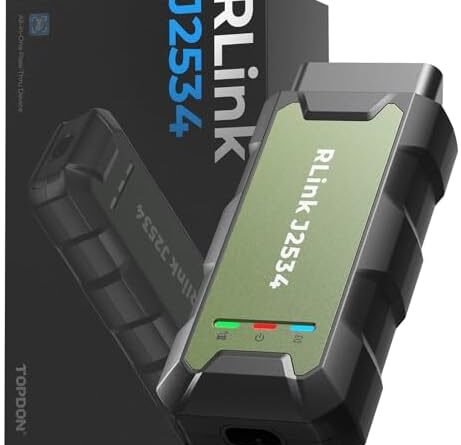
TOPDON RLink J2534 Pass-Thru Programmer, OEM Reprogramming and Diagnostic Tool, Enhanced J2534 VCI, Supports J2534/D-PDU/CAN-FD/DoIP, Compatible with 18+ Vehicle Brands, No OE Software Provided





Price: $299.00 - $269.00
(as of Apr 09, 2026 09:37:09 UTC – Details)

From the brand


Software Compatibility & Subscription Guide
Some brands offer multiple OEM software versions for different model years or functions, please read software descriptions carefully before subscribing to avoid purchasing the wrong version.
OE software setup involves multiple steps—recommended for users with prior OE experience or familiarity with OE workflows.
Chrysler Activation Note: When activating Chrysler OE software, you will be prompted to enter an SN, this is the software’s own SN (find it at: wiTECH2 → Help → About wiTECH2 → Serial Number), NOT your RLink device SN.
Pre-Installation Requirements
Please disable all antivirus software before installing RLinkPlatform or OEM software to prevent false positives and incomplete driver installation.
Important: Uninstall competing J2534 drivers first—our new AA-RLink registry prioritizes device recognition, but multiple J2534 drivers may cause registry conflicts.
Programming Precautions
Always use a stable power supply during programming to prevent voltage fluctuations causing failure.
Download OEM software from official websites only to ensure compatibility with new vehicle models.

Nissan tested and validated the devices:
TOPDON USA – Rlink J2534

Not compatiblewith 24V vehicle
TOPDON RLink X3 obd2 adapter
TOPDON Topscan Master
TOPDON RLink J2534 EnhancedVCI
TOPDON Topscan Pro
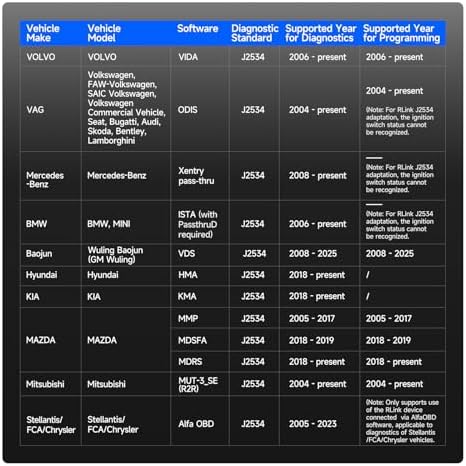
J2534 Pass-Thru Programmer: TOPDON RLink J2534 is an advanced diagnostic and reprogramming tool that support all J2534 protocols, as well as D-PDU, CAN-FD and DoIP, ensuring compatibility with a wide range of modern vehicles. It offers extensive versatility with support for over 18 major automotive brands, including Chrysler, Ford, GM, Nissan, Toyota, Honda, Subaru, Land Rover/Jaguar, Volvo, Wuling, Volkswagen/Audi, Mercedes-Benz, and BMW. NOTE: Not compatible with Ford IDS diagnostic software
All-in-One OEM Diagnostics: This J2534 ECU programming tool elevates your automotive repair capabilities to new heights by delivering complete OEM diagnosis. Boasting comprehensive full-system diagnostics, intuitive repair guides, advanced ECU programming and coding, common reset services, a vast library of repair information and more, this all-in-one solution empowers technicians to effortlessly tackle complex vehicle issues with ease. *Not compatible with 24V vehicles
Proven Performance You Can Trust: Backed by over 10000 real vehicle tests and benefit from a wealth of practical experience, this OEM reprogramming tool guarantees stable and exceptional performance. Supported by TOPDON’s dedicated technical experts with in-depth knowledge of both auto repair and J2534 Pass-Thru programming, the RLink J2534 provides prompt and professional assistance, ensuring a smooth setup and reliable compatibility
Integrated Excellence, Always Up-to-Date: Featuring the exclusive RLink Platform to provide a streamlined experience with one-click driver installation and management, ensuring flawless integration with your OE software, maintaining the original performance quality. The built-in operation guide makes mastering OE software quick and easy, so you can get started right away. Plus, with lifetime free updates, your diagnostics will stay current with the latest drivers and innovations
Efficiency Meets Versatility: Engineered to support three CAN channels simultaneously – CAN FD and CAN-CC included, giving you the edge in fast troubleshooting. To perfectly synchronized with the OE software, please diagnose with active subscriptions and make sure your computer system is running a compatible 64-bit Windows version (7, 8, 10 or later) to fully leverage the power of RLink J2534. *We don’t provide extra OE software
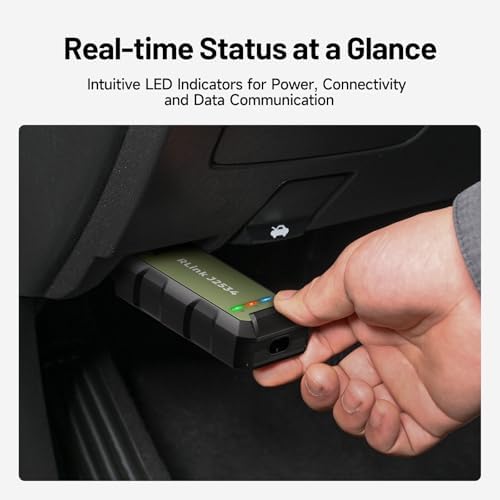
Effortless Setup: Getting started with the RLink J2534 diagnostic tool is a breeze. Simply plug it into the vehicle’s OBD port and connect it to your computer via the Type-c cable. Next, visit TOPDON’s official website to download the RLink Platform software. Once installed, launch the application and register to bind your device. Download the driver and set to RLink mode for optimal performance. With these easy steps, you’ll be ready to deliver superior diagnostics